The share function allows you to temporarily share your imaging with a trusted party such as a medical practitioner.
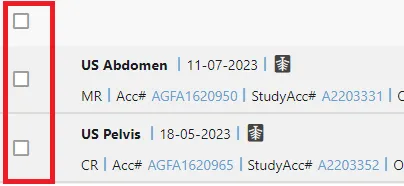
Select one or more ‘Exams’ by checking the box .
2. Click the ‘Share’ icon
3. To share the selected Exam(s) by email, enter at least one valid email address. If sending to more than one recipient, separate each email address with a comma.
4. There is an option to add an message for the recipient.
5. Next, select the appropriate duration for the sharing to remain active. Once the selected duration is reached, access expires for the recipient.
6. Next, click Share. This generates two emails
Email 1: contains a hyperlink issued to the trusted party to access the shared imaging.
Email 2: contains a onetime PIN-code issued to your trusted party. This is to secure your imaging. You should not need to action anything once your imaging is shared
Of note
Print & Print & Share are for specific use cases and not active.